
Integrating Privatemode AI with LiteLLM
LiteLLM is an open-source AI gateway: one OpenAI-compatible endpoint in front of 100+ model providers, with virtual keys, budgets, and logging. Adding Privatemode as one of those models sends the requests that carry sensitive data to open-weight models in an environment whose memory stays encrypted, while every client keeps talking to the same gateway.

Keep your gateway, change what happens to the prompts
The challenge
Every team's prompts meet at the gateway
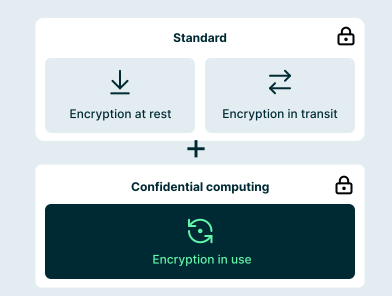
Platform teams run LiteLLM so that every team reaches models through one endpoint with shared keys, budgets, and logging. That puts customer data, source code, and internal documents from many teams on a single path. With a conventional provider behind it, all of that is processed in plaintext on the provider's servers.
The solution
One more model in your model list
Privatemode exposes an OpenAI-compatible API, so LiteLLM treats it like any other openai/ model. Run the Privatemode proxy next to the gateway and point api_base at it. Every request is encrypted before it leaves your infrastructure and processed in a hardware-isolated environment whose memory stays encrypted. By design, neither the infrastructure provider nor Privatemode can read it. This is verifiable through remote attestation and open-source code.
How to add Privatemode to LiteLLM
LiteLLM talks to the Privatemode proxy like to any OpenAI-compatible endpoint. The proxy verifies the Privatemode service through remote attestation and encrypts every request before it leaves your infrastructure. The example below runs both with Docker Compose.
Get your API key
If you don't have a Privatemode API key yet, you can generate one for free here.
Add Privatemode to your LiteLLM config
Save this as litellm_config.yaml. The openai/ prefix tells LiteLLM to treat the model as an OpenAI-compatible endpoint, and api_base has to end in /v1. The API key is a placeholder because the Privatemode proxy handles authentication. model_name is the name your applications use.
Run the proxy and LiteLLM
Save this as docker-compose.yml. Put PRIVATEMODE_API_KEY and a long random LITELLM_MASTER_KEY that starts with sk- into a .env file next to it, then start both with docker compose up. The Privatemode proxy stays inside the Compose network, so only LiteLLM can reach it.
Send a test request
Call the gateway with the model name from your config. From here, create virtual keys for your teams, or point any OpenAI-compatible client at http://localhost:4000.
Frequently asked questions about using Privatemode with LiteLLM
No. Privatemode is one more entry in model_list. Your clients, virtual keys, budgets, and the rest of your configuration stay as they are.
Your agent remembers everything. Your model provider shouldn't see it.

AI agents in Mattermost that keep your team's messages confidential.

Want to look for yourself?