
Integrating Privatemode AI with Hermes Agent
Hermes Agent is an open-source agent from Nous Research that keeps notes about you, writes its own skills, and answers in your terminal or in messaging apps like Telegram, Discord, and Slack. With Privatemode as its model provider, everything it reads and remembers is processed by open-weight models in an environment whose memory stays encrypted.

Let your agent remember everything without exposing it
The challenge
Your agent's memory goes to the model with every request
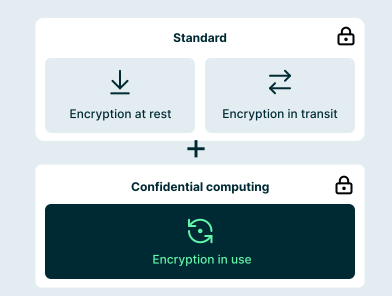
Hermes Agent builds up a profile of you, keeps notes on your projects, and can run commands on your machine. All of that reaches the model as part of the prompt, again and again. With a conventional provider, your memory notes, files, and terminal output are processed in plaintext on the provider's servers.
The solution
Encrypted before it leaves your machine
Hermes accepts any OpenAI-compatible API as a custom endpoint, and Privatemode provides one. The Privatemode proxy on your machine encrypts every request before it leaves, and the request is processed inside a hardware-isolated environment whose memory stays encrypted. By design, neither the infrastructure provider nor Privatemode can read your agent's context. This is verifiable through remote attestation and open-source code.
How to set up Privatemode in Hermes Agent
Get your API key
If you don't have a Privatemode API key yet, you can generate one for free here.
Run the Privatemode proxy
The proxy verifies the integrity of the Privatemode service using remote attestation. The proxy also encrypts all data before sending and decrypts data it receives.
Install Hermes Agent
Run the installer on Linux, macOS, or WSL2. For Windows PowerShell and other options, see the official docs.
Connect Hermes to the proxy
Run hermes model, choose Custom endpoint, and enter http://localhost:8080/v1 as the base URL, any placeholder as the API key because the proxy handles authentication, and a model name such as glm-5.3. Hermes saves your choice in ~/.hermes/config.yaml, where you can also set it by hand.
Start Hermes
Run hermes for a session in your terminal. To reach the agent from Telegram, Discord, Slack, or another messaging app, run hermes gateway setup. From now on, every model request goes through Privatemode.
Frequently asked questions about using Privatemode with Hermes Agent
Minimal. Hermes accepts any OpenAI-compatible API as a custom endpoint. Point it at the Privatemode proxy with hermes model, or set provider: custom and base_url under model in ~/.hermes/config.yaml. Your memory, skills, and gateway configuration stay as they are.
Your gateway routes every team's prompts. Your model provider shouldn't read them.

AI agents in Mattermost that keep your team's messages confidential.

Want to look for yourself?