
Confidential AI workflows with Privatemode and n8n
n8n workflows call models on schedules and webhooks, thousands of times. Pointing its AI nodes at Privatemode keeps that traffic encrypted before it leaves and encrypted in memory while it is processed.
The challenge
Every system n8n connects becomes AI input
n8n workflows pull data from your CRM, mailbox, ticketing system, databases, and document stores, then hand it to an AI node to classify, summarize, or extract. Customer records, contracts, and internal documents travel with it. With a conventional AI provider, all of that is processed in plaintext on the provider's servers, and it happens on every run, without anyone looking at what was sent.
The solution
The same workflows, a provider that cannot read them
Point n8n's AI nodes at the Privatemode proxy running next to it: one credential covers the AI Agent, the chains, and the embeddings behind your vector stores, so the switch is made once rather than per workflow. Every request is encrypted before it leaves and processed in a hardware-isolated environment whose memory stays encrypted, so by design neither the infrastructure provider nor Privatemode can read your data.
Set up confidential agents in n8n in just a few steps
Get your API key
If you don't have a Privatemode API key yet, you can generate one for free here.
Run the Privatemode proxy
The proxy verifies the integrity of the Privatemode service using confidential computing-based remote attestation. The proxy also encrypts all data before sending and decrypts data it receives.
Set up an AI agent in n8n
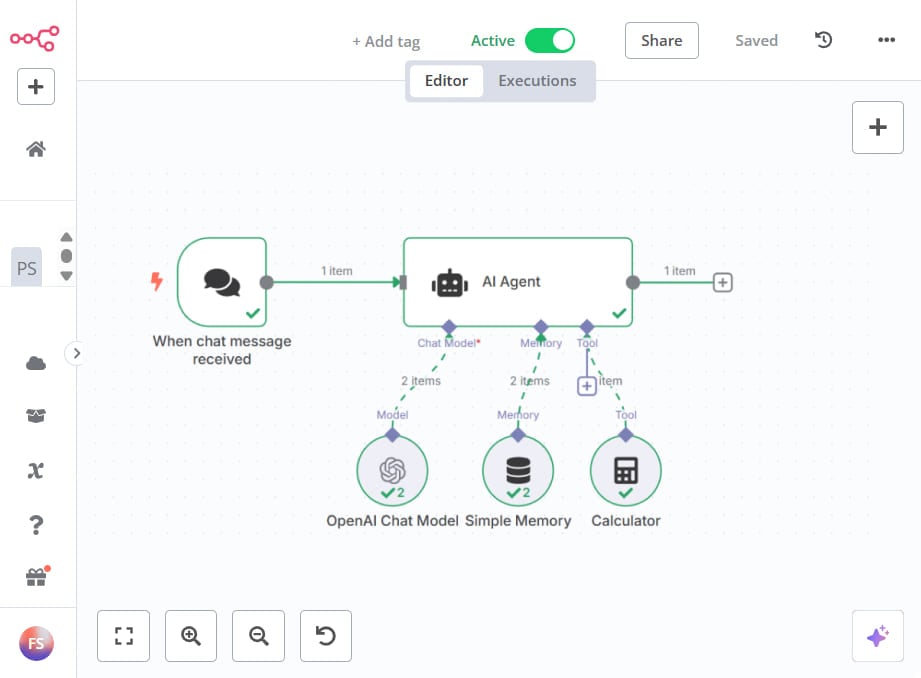
Follow the official n8n AI Agent documentation to set up an AI agent. Since Privatemode adheres to the OpenAI interface specification, you can use the standard OpenAI Chat Model node and configure its credentials to connect to Privatemode.
In addition to the AI Agent node, the OpenAI Chat Model can be used in several other powerful AI nodes, including:
- Basic LLM Chain
- Sentiment Analysis
- Summarization Chain
- Text Classifier
- Question and Answer Chain
- Information Extractor
For vector stores, use the Embeddings OpenAI sub-node with the same credential and the model qwen3-embedding-4b, so embeddings are computed through the proxy as well.
Adjust credentials
To ensure that all data is sent through the Privatemode proxy, set the following credentials for your OpenAI Chat Model node:
- API Key: Set this to a placeholder value, such as "placeholder". Authentication is handled by the proxy.
- Base URL: Set this to the /v1 route of your Privatemode proxy, for example, "http://localhost:8080/v1".
Set the parameters of the node
Set the parameters of the OpenAI Chat Model node to use the correct credentials and select the model you want to use.

Done!
You’ve successfully integrated Confidential AI into your workflow.
Frequently asked questions about using Privatemode with n8n
No structural changes are needed. You reconfigure the OpenAI Chat Model node credentials to point to the Privatemode proxy by changing the Base URL field. All AI nodes that use this model, including AI Agent, Basic LLM Chain, and Summarization Chain, are protected by confidential computing automatically.
Your agent remembers everything. Your model provider shouldn't see it.

Your gateway routes every team's prompts. Your model provider shouldn't read them.

Want to look for yourself?